Template for Wedding Planner
Wedding photo shot list template
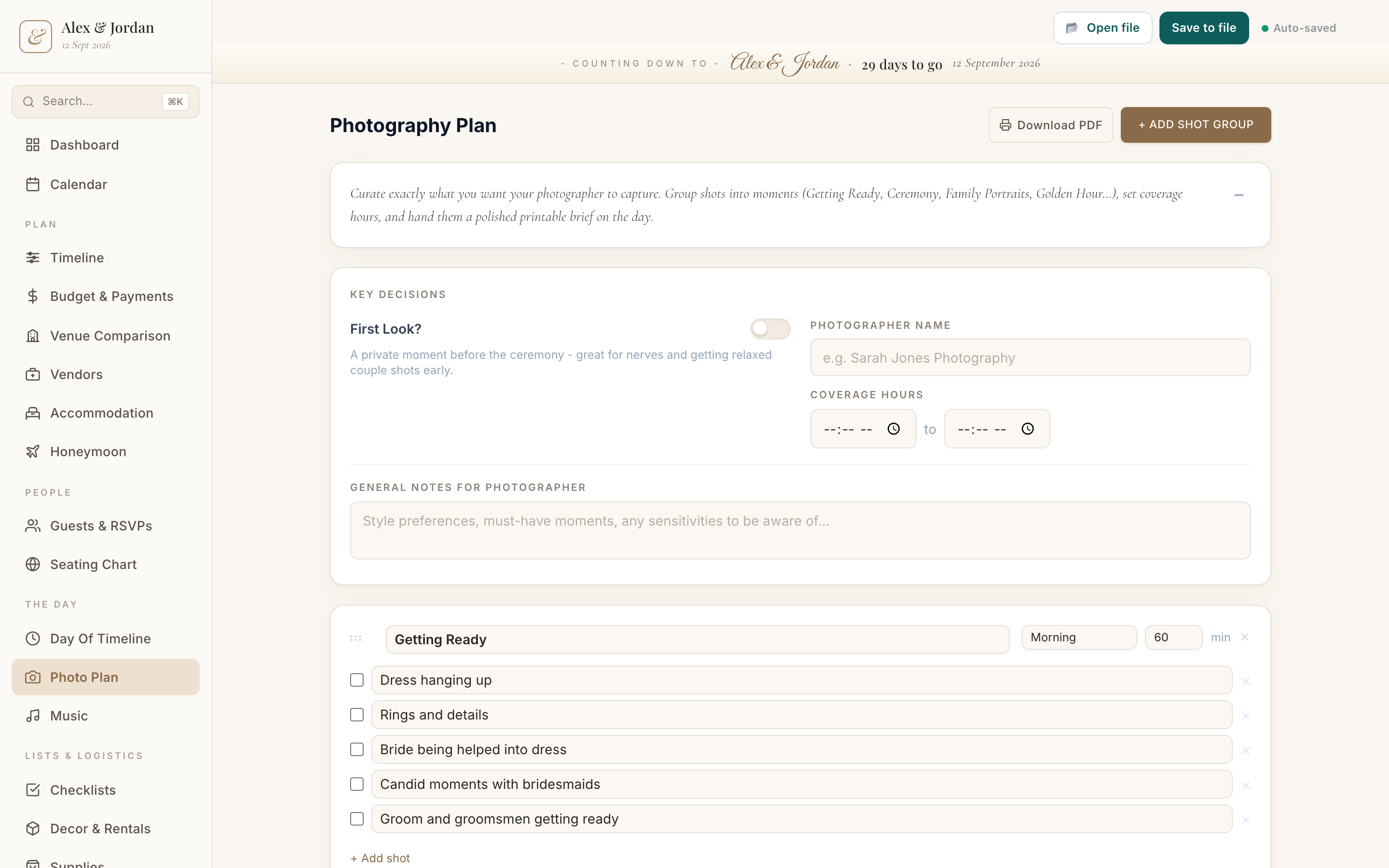
A wedding photo shot list template means you are not building the list from memory. Wedding Planner comes with the usual shot groups, getting ready, ceremony, family combinations and more, so you can tick the ones you want, add your own, and hand your photographer a clear brief.
What it is
A set of standard photo groups, each with common shots, that you tick and add to. The family-combinations list in particular saves a lot of time on the day.
When to use it
- Once you have booked your photographer
- When agreeing coverage hours and a first-look
- In the weeks before, to finalise the family groupings
How to fill it in
- 1Open the shot list; the standard groups are already there.
- 2Tick the shots you want and add any of your own.
- 3Build the family-combination list so nobody is missed.
- 4Set coverage hours and share the plan with your photographer.
Make one
Wedding photo shot list template in Wedding Planner
Wedding Planner comes with this ready to fill in, plus everything else you need to plan. Works in your browser or offline, with nothing to install.
Common questions
What is a wedding shot list?
A planned list of the photos you want, grouped into moments like getting ready, the ceremony, family portraits and the reception, so nothing important is missed.
Why is the family photo list so important?
Family groupings are where time disappears on the day. A written list, shared with your photographer, keeps that part quick and calm.